We planned to study power users. Few people knew the feature existed.
Duo sponsored our HCDE 517 team to study how UW students, instructors, and staff link personal accounts to Duo Mobile. We planned to test power users with five or more linked accounts.
Our screening survey reached 23 people. Nine of them did not know Duo could link personal accounts, and we could not recruit power users, so we refocused the study on linking an account for the first time.
I co-designed the screening survey, wrote its questions, and coordinated distribution through UW student and staff channels. I co-led affinity mapping of the session data with the team.
- 23
- Survey responses17 volunteered for testing. The survey doubled as the screener.
- 6
- Moderated sessionsFour students, one instructor, and one employee; four iPhone and two Android users.
- 3
- Tasks per sessionDescribe a Canvas login from memory, log in for real, then link a personal account.
Participants used the live Duo Mobile app on their own phones and thought aloud throughout.
After each task, participants rated it from 1 to 7 for ease, perceived length, and likelihood to keep using the feature. We logged time on task and success, then grouped observations in an affinity map.
We rated each issue on the HCDE 517 severity scale, which weighs how often a problem occurs, how hard it is to overcome, and whether it recurs. All three findings below received the scale’s highest rating, 4.
“Are you aware of the ability to add personal accounts (third-party apps) to Duo Mobile for authentication?”
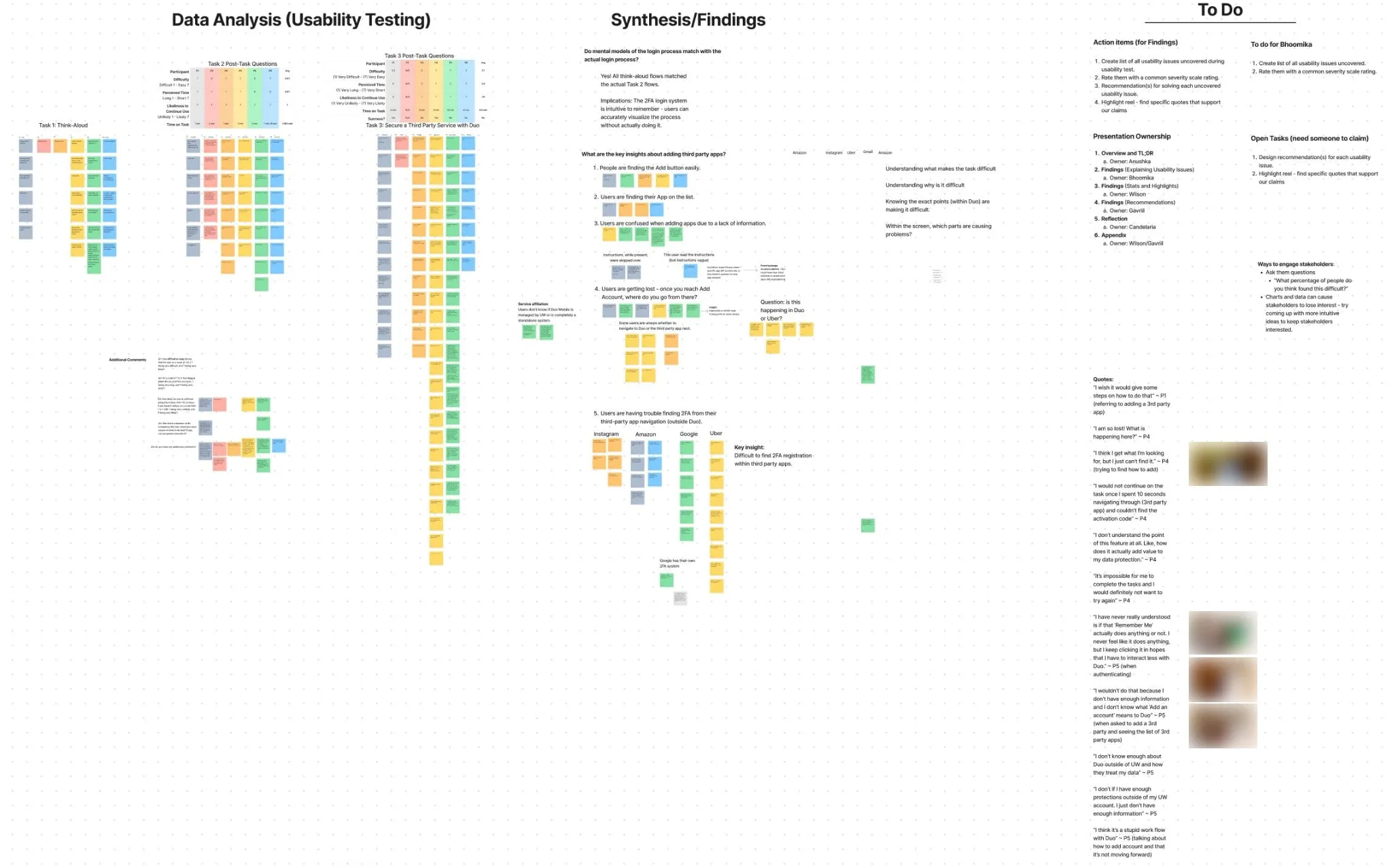
Walk the linking task
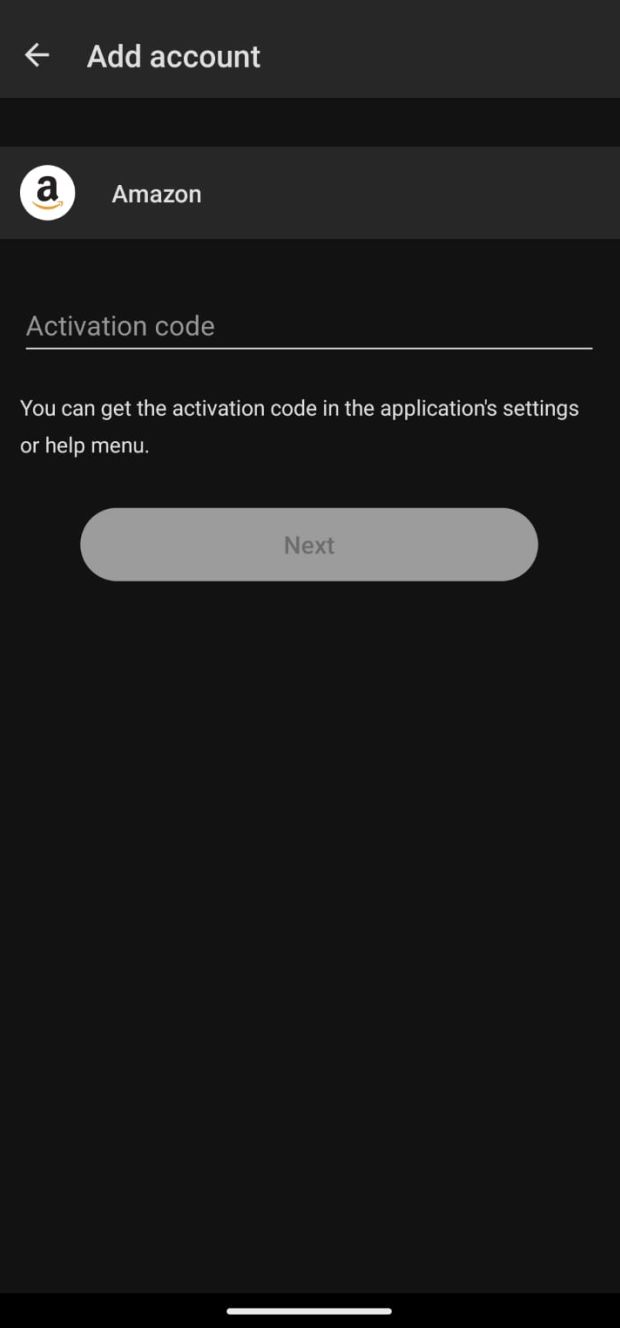
- What the screen did
- The code lives in the other service. This screen says only that it is in that service’s settings or help menu.
- What we saw
- Nothing showed how many steps remained. Five recorded attempts averaged 9.8 minutes, from 6 to 18.
- “The task felt impossible.”P6, usability session
- What we recommended
- Link directly to the relevant settings page in the other service where possible, and show progress through the steps.
From our annotated findings slides, 2024. Recommendations not tested.
Linking an account stalled at the next step.
- 2 of 6
- Linked an accountBoth needed a hint, redirection, or a web search.
- 9.8 min
- Average attemptFive recorded attempts, 6 to 18 minutes.
- 2.1
- Ease, out of 7Five post-task ratings.
- 1.6
- Likely to use again, out of 7Five post-task ratings.
Linking meant moving between Duo and another service to find a QR code or an activation code. Duo’s Add account screen offered a QR code option without saying where the code would come from. The activation-code screen said only that the code was in the other service’s settings or help menu, and nothing showed how many steps remained.
“The task felt impossible.”
P6, usability session
Our recommendation: link directly to the relevant settings page in the other service where possible, and show a progress indicator for the remaining steps.
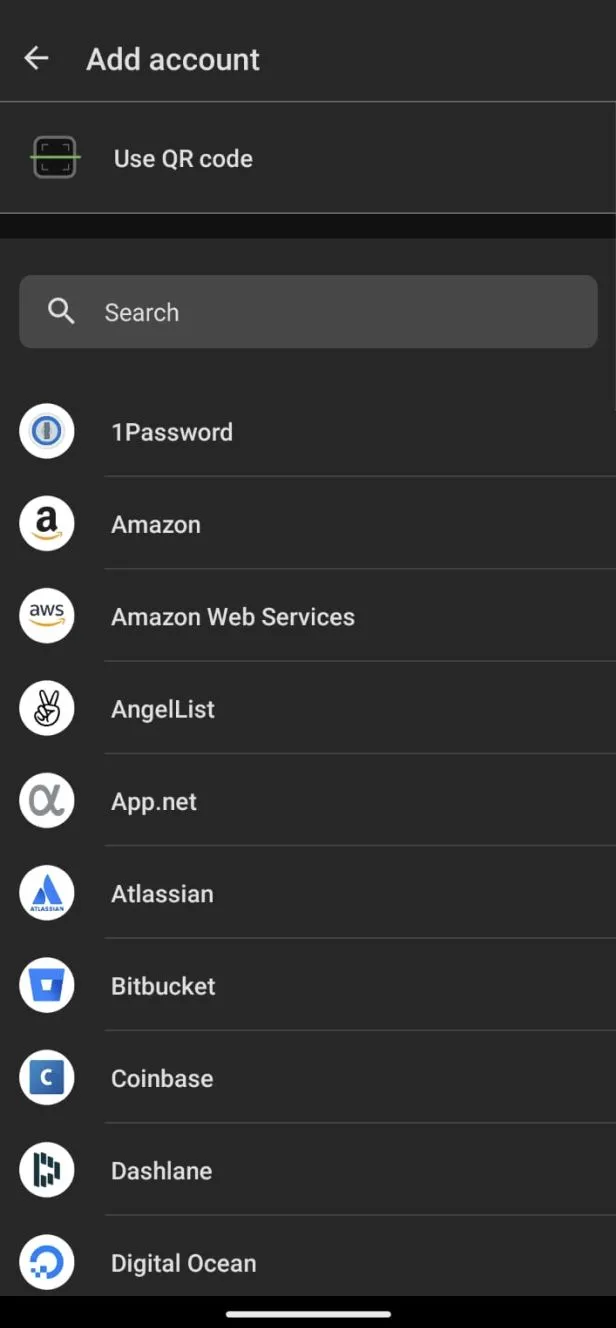
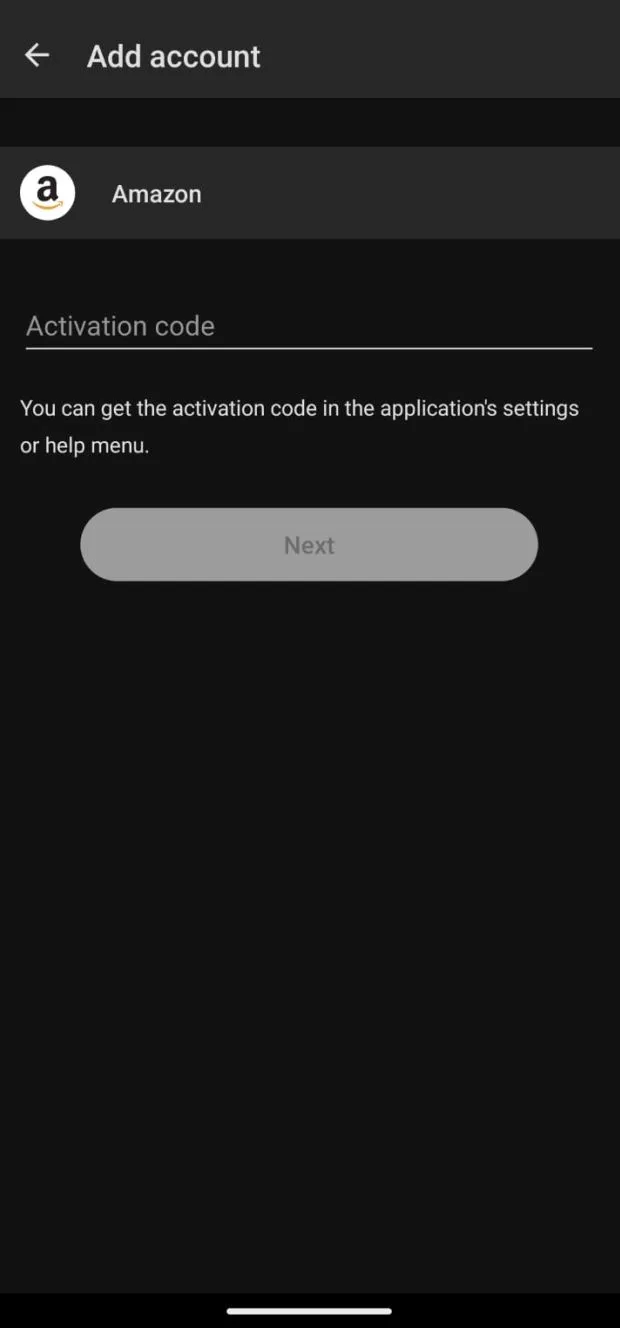
-
Missing context The QR code option did not say what it was for or where the code would come from.
-
Incomplete information The hint about where to find the activation code in the other app was incomplete and misled participants.
-
Unsure what comes next Nothing showed how long the task was or what steps remained.
Inspect the task data
| Measure | P1 | P2 | P3 | P4 | P5 | P6 | Average |
|---|---|---|---|---|---|---|---|
| Ease1 very difficult, 7 very easy | 5.5 | N/A | 2 | 1 | 1 | 1 | 2.1 |
| Perceived time1 very long, 7 very short | 6 | N/A | 3 | 1 | 2 | 1 | 2.6 |
| Likely to keep using1 very unlikely, 7 very likely | 4 | N/A | 1 | 1 | 1 | 1 | 1.6 |
| Time on task, minutes | 6 | N/A | 8 | 9 | 18 | 8 | 9.8 |
| Linked an account | Yes | N/A | No | Yes | No | No | 2 of 5 |
Generic instructions left people guessing.
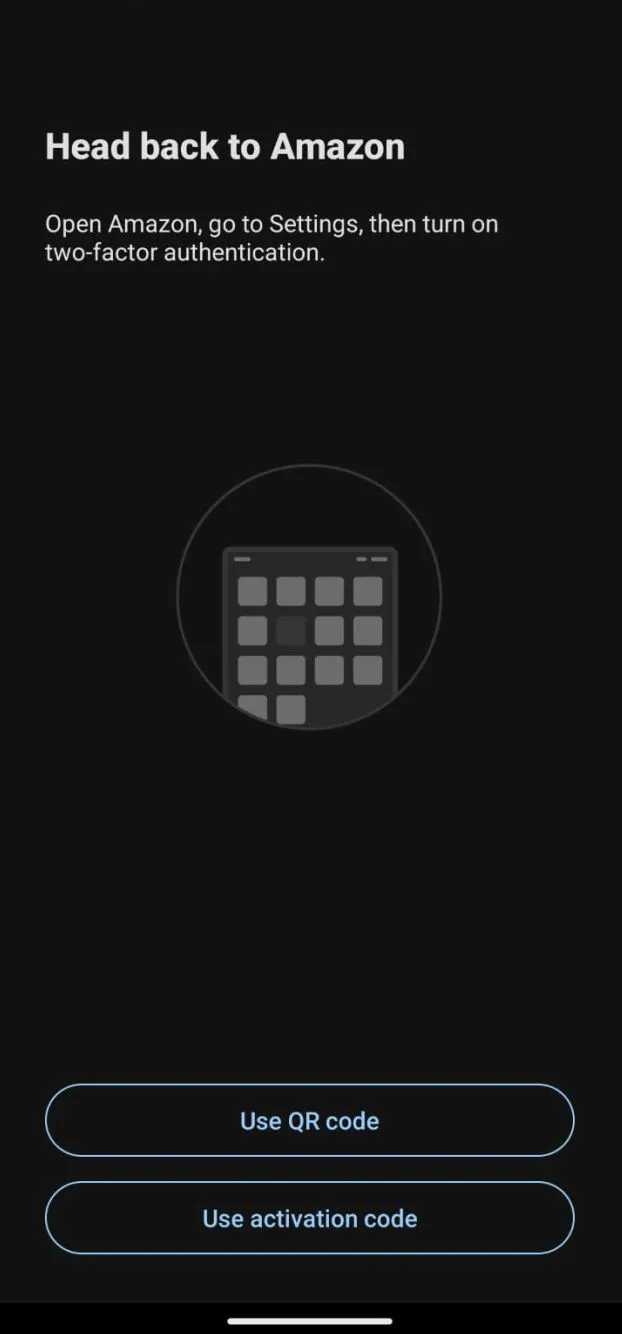
After a participant chose a service, Duo showed the same generic steps for every app: open it, go to Settings, and turn on two-factor authentication. Four of six participants were confused at this step.
A gray keypad icon suggested the process had stalled, and the QR code and activation code buttons did not connect to the instructions above them.
“I wish it would give some steps on how to do that.”
P1, usability session
Our recommendation: give instructions specific to the chosen service, with images of the menus to open, and explain when to scan a QR code and when to enter an activation code.
-
Incomplete instructions The steps were the same for every app and left parts of the process out.
-
Choice of icon color The gray keypad suggested a task that was stuck or unfinished.
-
Lack of connection The QR code and activation code buttons did not relate to the instructions above them.
Some believed Duo belonged to UW.
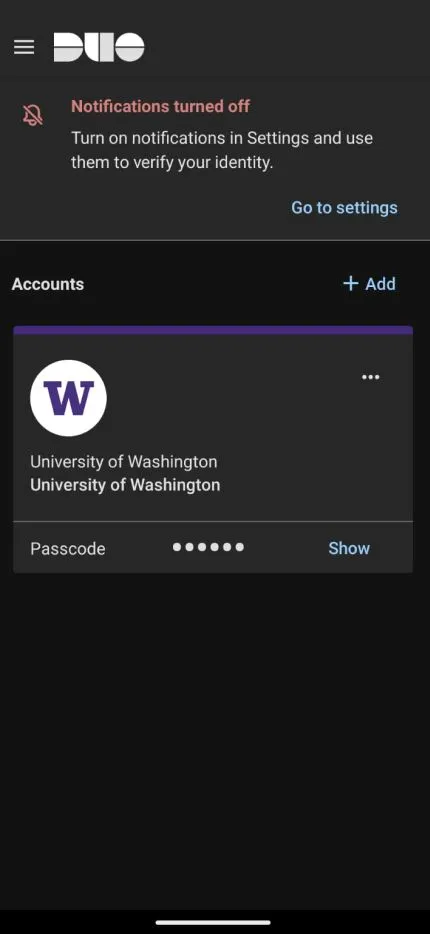
Three of six participants assumed Duo was a UW app. They hesitated to connect personal accounts to something they understood as university-run, and some did not see what linking would protect.
When our sponsor suggested a test Duo account instead, participants then hesitated to add personal accounts to an account that was not theirs.
“I don’t know enough about Duo outside of UW and how they treat my data.”
P5, usability session
Our recommendation: a short onboarding sequence that explains what Duo is and how linking protects an account, with a reminder at the moment someone adds a personal account.
-
Lack of context and introduction Nothing explained what the app is or how it keeps accounts secure.
-
Reliability No help or info button explained what Add and the account actions do.
-
What does this do? Participants did not see why they would add accounts unless they were required to.
Recommendations for the linking flow.
We delivered a study report and a findings presentation to our Duo sponsor at the end of winter quarter 2024.
The study describes six UW-affiliated participants. The survey reached 23 people, short of the 50 we planned. Team members moderated different sessions without a pilot session, one linking attempt went unrecorded, and participants’ reluctance to link personal accounts shaped what we could observe.
| What we saw | What we recommended | Who would act |
|---|---|---|
| No clear next stepParticipants could not find the code in the other service or tell how many steps remained. | Link to the service’s settings where possible and show progress through the steps. | Design, with engineering for links into other services |
| Generic instructionsThe same steps appeared for every service, beside unexplained QR code and activation code options. | Give service-specific instructions with menu images, and explain the two linking methods. | Design and content, with engineering to keep each service’s steps current |
| Unclear ownershipParticipants assumed Duo was a UW app and hesitated to link personal accounts. | Explain what Duo is and how linking protects an account, during onboarding and at setup. | Product and marketing, with design |
A follow-up study would pilot the tasks, record assistance the same way in every session, and compare completion with the recommended flow.
Looking back, the screens were the last of three obstacles.
My reading now, not part of what we delivered.
All three findings received the top severity rating, so our report gave Duo no order. I would order them by where people stopped.
- 9 of 23
- Did not know Duo could link personal accountsScreening survey.
- 3 of 6
- Assumed Duo was a UW appUsability sessions.
- 2 of 6
- Linked an account, both with helpUsability sessions.
The survey and the sessions reached different people, so these are three separate obstacles, not one funnel.
Each obstacle comes before the next. Someone who does not know about linking never reaches the Add account screen, and someone who sees Duo as the university’s app has little reason to finish. Clearer instructions help only the people who get past both.
That makes the middle obstacle a question for product and marketing more than for design. Duo reaches people through their institution, so it looks like the institution’s app. Participants hesitated even when offered a test account. People need to see Duo as their own before linking a personal account to it makes sense.
I would leave login alone. All six participants logged in, and each described the login accurately from memory first. Anything added to explain personal accounts should stay out of that required path.
What I would do next: instrument the linking flow before redesigning it. If most attempts end before someone chooses a service, the work is awareness and trust. If most end after, it is service-specific instructions and links.