One application, five assignments.
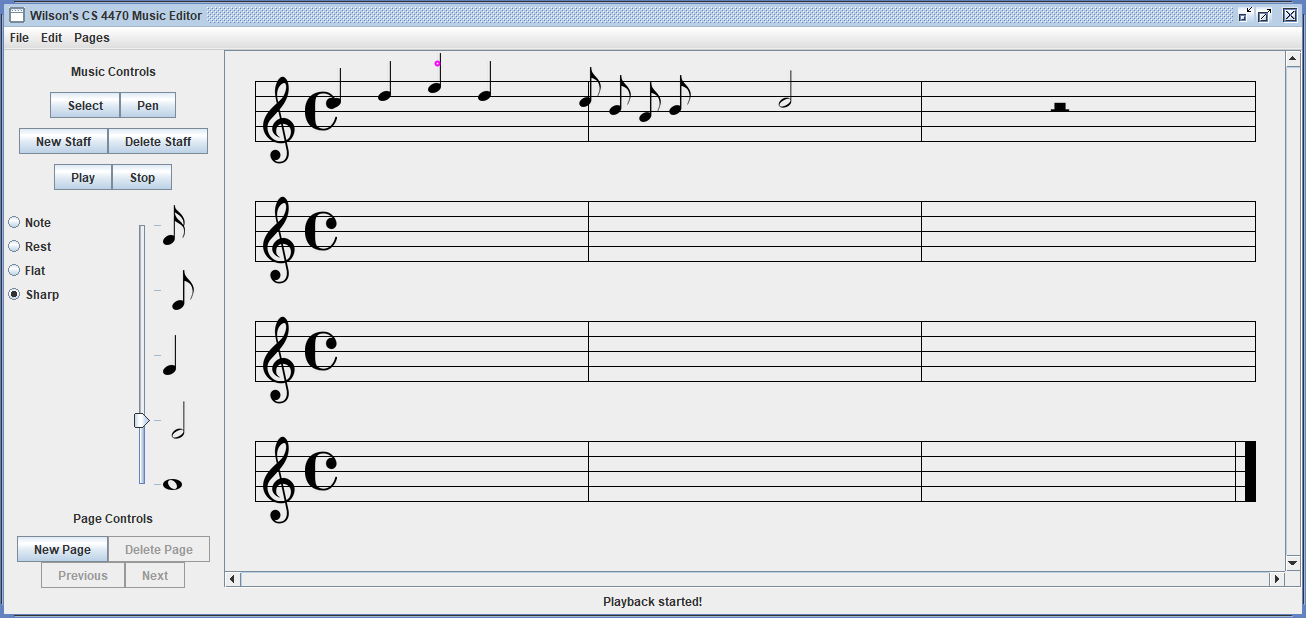
The course taught how interface toolkits work underneath: layout, painting, input, recognizers, and animation. Each assignment added one of those to the same editor, so earlier decisions had to survive later ones.
The captures above come from the original builds, run again in 2026.
Controls before content.
The first build was layout only: tool buttons, staff controls, note types, a duration slider, menus, and a status line, all from standard Swing components. I added support for multiple pages of music, with page controls that also work from the menu bar and enable or disable to match the current state.
A custom component for the staff.
Next came a custom component that paints the staves, clef, and time signature, and places notes and rests from images. Clicking adds a symbol of the chosen duration; the status line names its pitch.
The third assignment refined editing: notes snap to the staff lines and spaces, and ledger lines appear for notes above or below the staff.
Gestures instead of buttons.
Pen mode added a $1 unistroke recognizer. A stroke drawn on the staff is matched against templates and becomes a note, rest, or accidental, and the stroke fades out as it is recognized. A zig-zag drawn starting on a note deletes it.
In the same build I kept rests at a fixed height on their staff, as in standard notation, and stopped accidentals from attaching to rests.
A ball that follows the music.
The last assignment animated playback: a ball bounces from note to note, timed to each note’s duration, using a Swing timer to step the animation.